|
CAD许可过期怎么办?最简单的方法就是重新激活,下面小编就来讲一下只适合win7以上系统的重新激活的方法。
8 Q9 b" d! O1 X; z( s1、首先在C盘中找到隐藏文件夹:“C:\ProgramDataFLEXnet”。9 E4 L; _& D* H# B$ \' B5 E
2、删除下面这两个文件:“adskflex_00691b00_tsf.data,adskflex_00691b00_tsf.data_backup.001”。 Y; P& F g) ?3 g% f
3、最后启动应用,然后使用注册机重新激活即可。
" j- d0 M/ V7 q& M* C5 h" d- v
https://www.autodesk.com/support/technical/article/caas/tsarticles/ts/f5IhBc15i0kOwzBb8lcEN.html Autodesk Licensing Service updates are applicable to the 2020 and later product versions. How to install Autodesk Desktop Licensing Service Windows: - Close all Autodesk products.
- Download and unzip the AdskLicensingInstaller-win-14.1.0.10619installer file.
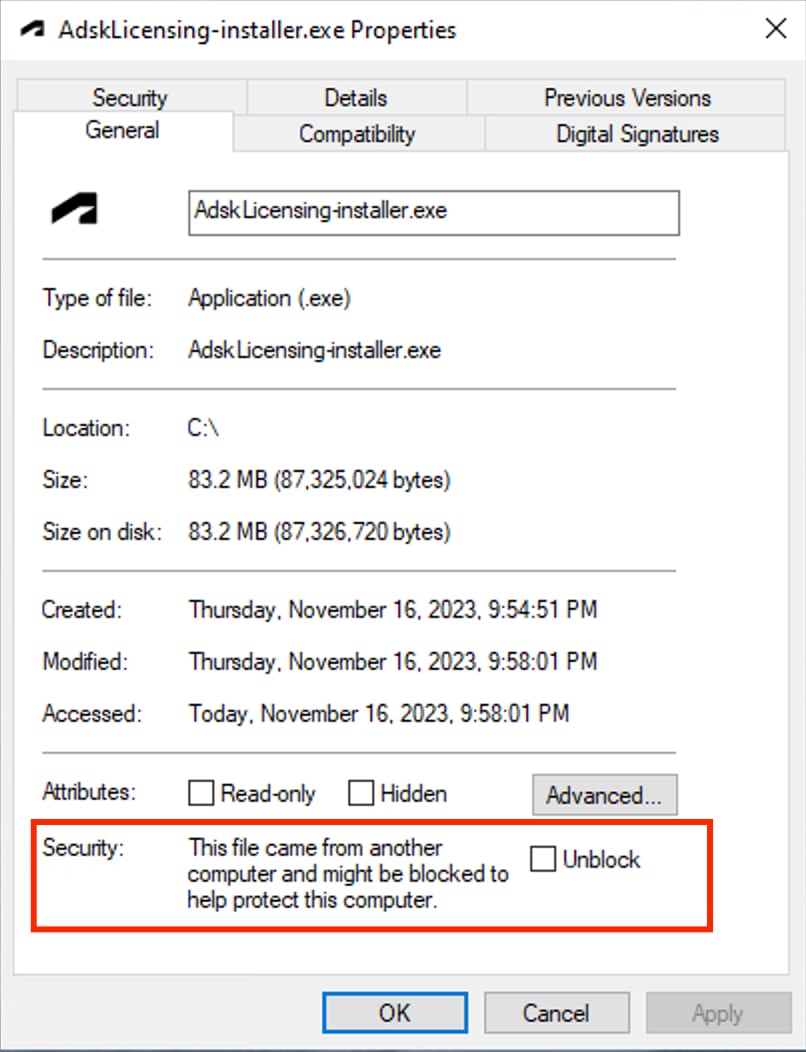
- Right-click the AdskLicensing-installer.exe file and go to Properties > General Tab.
& g2 N% J$ B% q
Important: If you see a Security section at the bottom of the window (as shown in the following screenshot), select Unblock. 4. Click OK to close the window.
6 c8 H1 p' W1 ~& ]8 l% d 5. Double-click the EXE file to start the installation.
* q. @' s$ ?( B& r" M ~5 ~7 s- g6 O. j2 G) T/ Y& ]4 J( q% w
( J; g" \+ B6 w% H7 Z' d9 y
7 ]0 e# K& F, @- S
2 @' c+ n& F& S" q修改HOSTS文件 这些大都是自己在防火墙上的记录的清单 启动时程序访问的就是这些地址 adobe
* E; H3 Y1 S% \1 y; Q! h127.0.0.1 activate.adobe.com 127.0.0.1 practivate.adobe.com 127.0.0.1 ereg.adobe.com 127.0.0.1 activate.wip3.adobe.com 127.0.0.1 wip3.adobe.com 127.0.0.1 3dns-3.adobe.com 127.0.0.1 3dns-2.adobe.com 127.0.0.1 adobe-dns.adobe.com 127.0.0.1 adobe-dns-2.adobe.com 127.0.0.1 adobe-dns-3.adobe.com 127.0.0.1 ereg.wip3.adobe.com 127.0.0.1 activate-sea.adobe.com 127.0.0.1 wwis-dubc1-vip60.adobe.com 127.0.0.1 activate-sjc0.adobe.com 127.0.0.1 *.autodesk.com.cn 127.0.0.1 *.autodesk.com 127.0.0.1 autodesk.com 127.0.0.1 webservices.autodesk.com 127.0.0.1 genuine-software2.autodesk.com 127.0.0.1 acad-be-prod-alb-1443566626.us-east-1.elb.amazonaws.com 127.0.0.1 s3-w.us-east-1.amazonaws.com 127.0.0.1 fp3011.wpc.phicdn.net ) e- Z, R. s; a" g- ?' A: g5 k# i
coreldraw也是一样2 U; R. y7 `( h' Q# @
* W* S4 B. X1 {
127.0.0.1 apps.corel.com
6 Y+ o+ l$ @3 \8 [$ i# f1 h% T5 j127.0.0.1 mc.corel.com
7 Y b5 K2 d/ H R127.0.0.1 origin-mc.corel.com6 W" C7 s: [7 e7 B5 P9 m
127.0.0.1 iws.corel.com6 l3 {/ w$ D7 ~2 n/ O2 \
127.0.0.1 ipm.corel.com
% U" a& ~1 ?! \3 a5 L127.0.0.1 sws.corel.com
9 p! f, _/ s0 _) ]127.0.0.1 dam.corel.com
( C" e5 p6 E$ ]127.0.0.1 fp3011.wpc.phicdn.net
1 [% ]5 W& T: l3 Y127.0.0.1 e8218.dscb1.akamaiedge.net1 M$ e! b3 K! ^7 A' B) ?
( L' Y/ X- E8 w) F. d$ q2 T2 F: T. [% i3 @& i8 h
|  |手机版|小黑屋|赛格电脑 华强北 电脑城 南山赛格 龙岗电子世界 龙华电脑城 沙井电脑城 松岗电脑城 pc4g.com
( 粤ICP备16039863号 )
|手机版|小黑屋|赛格电脑 华强北 电脑城 南山赛格 龙岗电子世界 龙华电脑城 沙井电脑城 松岗电脑城 pc4g.com
( 粤ICP备16039863号 )

 发表于 2024-3-26 18:08:45